
A single flat network can turn one compromised password, infected laptop or poorly secured device into a business-wide incident. This network segmentation guide explains how small and medium-sized businesses can separate systems intelligently, restrict the spread of threats and keep essential services available when something goes wrong.
For many SMEs, the network has grown organically. Staff devices, Wi-Fi, cloud services, printers, phones, CCTV cameras and guest access may all sit on the same network because it was quick to set up. That arrangement is convenient until a phishing attack, ransomware infection or unauthorised device gains a foothold. Segmentation introduces sensible boundaries, so a problem in one area does not automatically become a problem everywhere.
What network segmentation means in practice
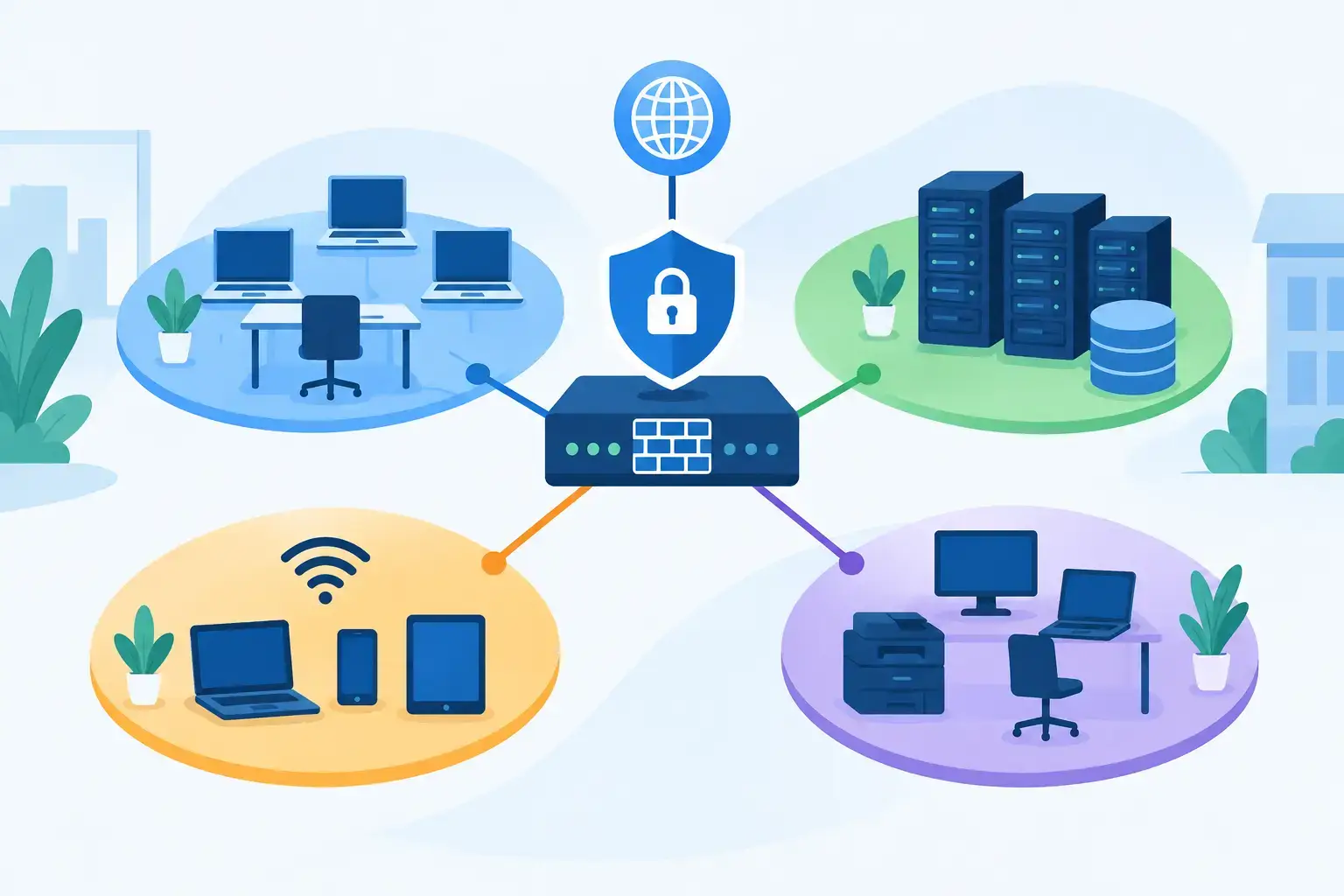
Network segmentation divides a business network into separate zones. Each zone contains users, devices or systems with similar purposes and risk levels. Rules then control which zones can communicate, what they can access and under what conditions.
Think of it as putting fire doors inside your premises. People can still move where they need to go, but a fire in one room is less likely to spread through the building. On a network, this means a compromised guest device should not be able to reach finance records, and a vulnerable printer should not have unrestricted access to servers.
Segmentation does not require a large enterprise network or an overly complicated design. The right approach for an SME is proportionate: protect the systems that matter most, support how people actually work and avoid creating barriers that slow down the business.
Why segmentation reduces business risk
Cyber criminals often rely on lateral movement. After gaining access to one device, they search for shared folders, administrator credentials, backups, servers and other valuable targets. A flat network makes that journey easier because there are few internal controls.
Segmentation limits that opportunity. If an attacker compromises a staff laptop, properly configured rules can prevent it from reaching sensitive data, management interfaces or backup infrastructure. The same principle applies to an infected smart TV in a meeting room, a visitor’s phone on Wi-Fi or a legacy device that cannot be fully secured.
The benefit is not limited to security. Separation also makes faults easier to contain and diagnose. A guest Wi-Fi issue should not interrupt business applications. High-bandwidth traffic from cameras or large file transfers should not affect voice calls. When each service has an appropriate place, IT teams can identify what is happening faster and restore normal operations with less disruption.
Start with what your business needs to protect
The first step is not choosing a firewall feature or redesigning every switch. It is understanding your systems, data and working practices. Identify where critical information lives, who needs access and what would happen if a particular service became unavailable.
For an SME, the highest-priority assets often include financial systems, customer information, line-of-business applications, cloud administration accounts, servers, backups and VoIP services. These do not all need their own separate network, but they should not be treated the same as guest devices or general office equipment.
It also helps to identify the devices that create additional risk. Printers, CCTV systems, door-entry equipment, meeting-room hardware and Internet of Things devices are often overlooked. They may need internet access or a connection to a management platform, but they rarely need to communicate freely with staff computers.
A practical assessment should answer three questions: what must be available for the business to operate, who genuinely needs access, and what traffic is unnecessary? Those answers form the basis of useful segmentation rules.
A sensible network segmentation model for SMEs
The exact design depends on the number of sites, users, applications and devices involved. However, most small businesses can begin with a small number of clear zones rather than dozens of complicated segments.
Staff devices and core business systems
Staff laptops and desktops need access to the applications, files and cloud services required for their roles. They should not, by default, have unrestricted access to network administration tools, backup repositories or every server.
Core systems deserve tighter controls. This may include file servers, application servers, finance platforms and infrastructure management systems. Access should be limited to approved users and services, with multifactor authentication and least-privilege permissions supporting the network controls.
Guest Wi-Fi and personal devices
Guest Wi-Fi should be entirely separate from the business network. Visitors need internet access, not access to printers, shared drives or internal devices. The same is usually true for personal mobile phones, unless there is a managed bring-your-own-device policy with appropriate security controls.
This is one of the simplest and most valuable changes a business can make. It improves security without affecting day-to-day productivity for staff or visitors.
Printers, phones, cameras and smart devices
Operational devices need special consideration. A printer may need to receive jobs from staff devices and communicate with a print-management service. IP phones require access to their voice platform. Cameras may need to send footage to a recorder or approved cloud service.
Place these devices in a separate segment and allow only the specific connections they require. This reduces exposure if a device is unpatched, misconfigured or no longer supported. It also prevents these systems from competing with business-critical traffic.
Management and backup systems
Administrative access is highly valuable to attackers. Firewall consoles, switches, Wi-Fi controllers, server management interfaces and backup platforms should sit behind the strongest controls. Only authorised IT administrators should be able to reach them, ideally from managed devices and through controlled access methods.
Backups require particular care. If ransomware can access and encrypt backup data as easily as it can access production files, recovery becomes far more difficult. Segmentation should form part of a wider recovery plan that includes protected credentials, tested restores and copies that cannot be altered by a compromised account.
How to implement segmentation without disrupting operations
A staged approach is safer than attempting a large overnight change. Begin by documenting the existing network, including internet connections, switches, wireless access points, servers, cloud services, printers and specialist equipment. Many businesses discover unknown devices or outdated connections during this process.
Next, create the highest-value separation first: guest access, business users, critical systems and operational devices. Modern business firewalls, managed switches and wireless platforms can usually support separate virtual networks and rules between them. The technology matters, but the rules matter more. Permit required traffic explicitly, then block what is not needed.
Before enforcing restrictions, test common tasks with representative users. Can staff print? Can phones register? Can authorised teams access the applications they need? Can remote workers connect securely? Testing prevents security improvements from becoming unexpected service interruptions.
Documentation is essential. Record the purpose of each network segment, the devices it contains, the permitted connections and the person responsible for approving changes. Without this, rules can become confusing over time and staff may bypass controls simply to get work done.
Common mistakes to avoid
The most common mistake is treating segmentation as a one-off technical project. Networks change when new staff join, applications move to the cloud, offices relocate or suppliers install equipment. Rules need reviewing as part of normal IT management.
Another problem is creating too many segments too quickly. Excessive complexity can make troubleshooting difficult and increase the chance of misconfiguration. Start with meaningful boundaries, then add detail where there is a clear risk or operational reason.
It is also risky to assume segmentation replaces other security measures. It works alongside managed endpoint protection, patching, identity controls, secure backups, staff awareness and monitoring. A segmented network contains incidents more effectively, but it cannot prevent every compromise.
Finally, avoid rules that are too broad. Allowing ‘any device’ in one segment to communicate with ‘any service’ in another defeats much of the purpose. Where possible, define access by device type, service, port and approved destination.
When to seek specialist support
Segmentation becomes more complex when a business has multiple locations, hybrid cloud services, legacy applications, remote access requirements or compliance obligations. In these cases, a poorly planned change can affect business systems, telephony or connectivity.
An experienced managed IT partner can assess the current environment, identify practical risks and build a phased plan that fits the organisation rather than forcing an enterprise design onto a small business. For Dublin SMEs, Host-It can help align network security, connectivity, backup and ongoing support so the controls remain effective after implementation.
The goal is not to make your network difficult to use. It is to make a single mistake, failed device or cyber incident less likely to stop the whole business. Start with the systems your team cannot afford to lose, separate them from everyday and guest activity, then review the design as your business changes.